
1. Beranda
  2. Bantuan Chrome
  3. How do I use Speechify on Google Docs?
Dipublikasikan pada Bantuan Chrome

How do I use Speechify on Google Docs?

Cliff Weitzman

Cliff Weitzman

CEO/Pendiri Speechify

apple logoApple Design Award 2025
50J+ pengguna

Learn how to use Speechify on Google Documents

Speechify now supports reading all your Google Documents! 💃 🎊

​Here's a small demo minus the audio of how it works on Google Docs -
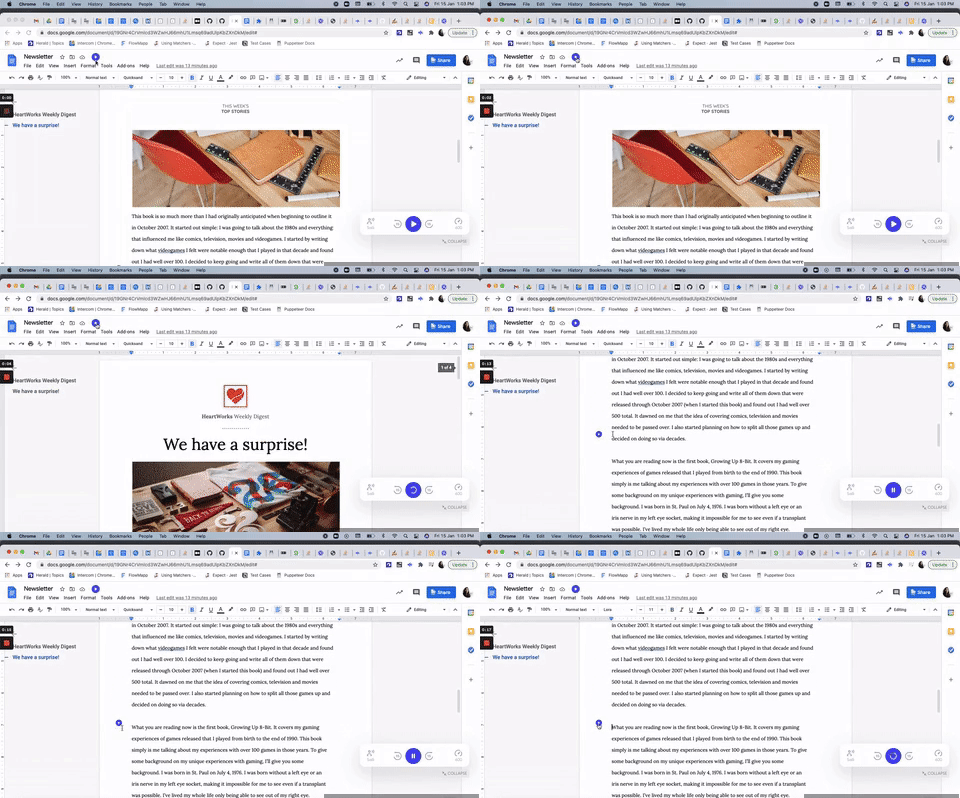
There are 3 ways you can have Speechify start reading your Google Doc from the beginning:

  1. Click on the small blue play icon that appears near the title of the document
  2. Click on the Speechify plugin > 'Play' ▶️ button
  3. Press the shortcut ALT+Q (for Windows) and OPT+Q (for Mac)

You can also read specific paragraphs / portions of text on the Google Doc:

  1. If you need it to start reading from a particular paragraph, click on the play icon next to the paragraph you wish to read it from.
  2. If you need to read selected text:
    - Drag your cursor and select the text > click on the play icon near the title of the document
    - Drag your cursor and select the text > press the shortcut keys to play the selected text

Nikmati suara AI tercanggih, file tanpa batas, dan dukungan 24/7

Coba gratis
tts banner for blog

Bagikan artikel ini

Cliff Weitzman

Cliff Weitzman

CEO/Pendiri Speechify

Cliff Weitzman adalah advokat disleksia, sekaligus CEO dan pendiri Speechify, aplikasi text-to-speech nomor 1 di dunia dengan lebih dari 100.000 ulasan bintang 5 dan peringkat pertama di App Store untuk kategori Berita & Majalah. Pada tahun 2017, Weitzman masuk daftar Forbes 30 Under 30 berkat upayanya membuat internet lebih mudah diakses bagi penyandang disabilitas belajar. Cliff juga pernah tampil di EdSurge, Inc., PC Mag, Entrepreneur, Mashable, dan berbagai media terkemuka lainnya.

speechify logo

Tentang Speechify

#1 Pembaca Teks ke Ucapan

Speechify adalah platform teks ke ucapan terkemuka di dunia, dipercaya oleh lebih dari 50 juta pengguna dan didukung oleh lebih dari 500.000 ulasan bintang lima di berbagai aplikasi teks ke ucapan iOS, Android, Ekstensi Chrome, aplikasi web, dan desktop Mac. Pada tahun 2025, Apple memberikan Speechify penghargaan terhormat Apple Design Award di WWDC, menyebutnya sebagai “sumber penting yang membantu orang menjalani hidup mereka.” Speechify menawarkan 1.000+ suara alami dalam 60+ bahasa dan digunakan di hampir 200 negara. Suara selebriti termasuk Snoop Dogg dan Gwyneth Paltrow. Untuk kreator dan bisnis, Speechify Studio menyediakan alat canggih, termasuk AI Voice Generator, AI Voice Cloning, AI Dubbing, dan AI Voice Changer. Speechify juga menyokong produk-produk terkemuka dengan API teks ke ucapan berkualitas tinggi dan hemat biaya. Telah diliput di The Wall Street Journal, CNBC, Forbes, TechCrunch, dan banyak media besar lainnya, Speechify adalah penyedia teks ke ucapan terbesar di dunia. Kunjungi speechify.com/news, speechify.com/blog, dan speechify.com/press untuk informasi lebih lanjut.


