

In the age of digital interaction, creating talking avatars has become increasingly popular. Leveraging AI technology, creators can design a custom avatar that mimics real human movements and facial expressions, including a talking mouth. This article will guide beginners through creating high-quality, animated talking avatars for free, touching on a range of free AI apps and software.
How Do You Make an Avatar that Speaks?
The creation of a talking avatar usually involves the following steps:
- Select a Template: Start by choosing an avatar template from the library provided by your chosen software. Many platforms provide a wide range of templates to cater to diverse needs.
- Customize the Avatar: After selecting a template, customize your avatar. This can involve changing the avatar's hair, skin color, clothing, accessories, and more.
- Add Voiceover or Text-to-Speech: Next, add a voiceover to your avatar. This can be done through recording your voice, using a pre-recorded voiceover, or employing text-to-speech technology.
- Sync the Avatar's Lip Movements: Synchronize the avatar's lip movements with the voiceover to create a realistic lip-syncing effect. Some platforms use artificial intelligence to automate this process.
- Animate the Avatar: Add movements and facial expressions to your avatar to make it more engaging. This can be done manually or using AI tools.
- Export Your Video: Once you're satisfied with your avatar, you can export the video in a suitable format for your intended use, such as for social media or e-learning purposes.
Apps and Software for Creating Talking Avatars
There are numerous applications that can help you create a talking avatar. Here are the top 8 options:
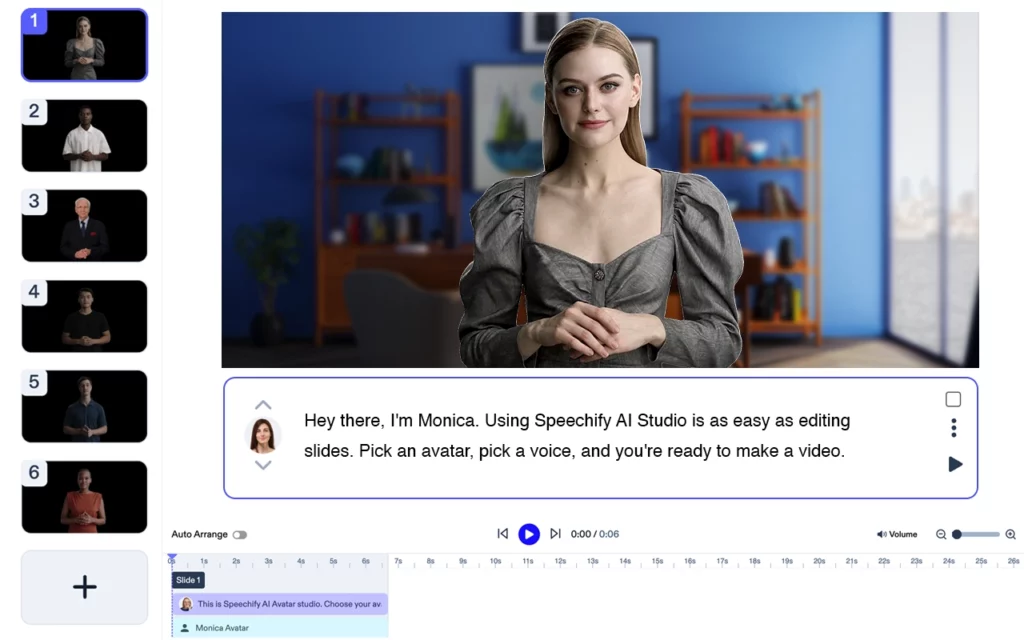
Speechify Video: Speechify Video is the premier talking avatar video creator. Simply upload your script and choose your avatar and create stunning and compelling videos in minutes.

Voki: Voki is a popular free talking avatar app that allows users to create personalized speaking avatars for education or business.

SitePal: SitePal offers a wide variety of customizable characters and text-to-speech options. Although it's not entirely free, they offer a 15-day free trial.

Adobe Character Animator: This Adobe software is a powerful tool for creating and animating characters using your webcam, which captures your facial expressions in real-time.
Synthesia: Synthesia is an AI video generation platform that can convert text-to-video, making it a great tool for creating explainer videos or tutorials.
D-ID: This platform uses AI to create high-quality, talking avatars from a single photo. However, it is more suitable for professional uses due to its pricing.
CrazyTalk: CrazyTalk specializes in creating animated talking heads. It offers intuitive tools for beginners and advanced features for professionals.

ChatGPT: While not specifically designed for creating avatars, OpenAI's ChatGPT can power your avatar's dialogues with convincing AI-generated text.
PowerPoint: With a little creativity, you can even use PowerPoint to create simple talking avatars using its animation and transition features.
Using Talking Avatars Effectively
Now that you have your talking avatar, it's important to use it effectively. Engage your audience with dynamic facial expressions, animated movements, and a natural-sounding voiceover. Don't forget to utilize screen recording tools to record your interactions with AI avatars in real-time.
Remember, while creating engaging videos with a talking avatar can seem complex, with the right tools and a bit of practice, it becomes a fun and creative process.
Lastly, keep exploring new AI tools and updates to the software listed here. The world of AI avatars is constantly evolving, and there's always something new to learn! So go ahead, create your avatar video and make your mark in this digital era!
Creating an avatar that can talk and interact with others has never been easier with the advent of numerous tools and applications. Here's a look at how you can accomplish that:
What is the App Where You Can Make an Avatar and Talk to People?
Voki is a fantastic app where you can make an avatar and talk to people. It's particularly popular in education settings, allowing teachers to create avatars to engage students in a unique and interactive way.
What is the Free Talking Avatar App?
A great example of a free talking avatar app is My Talking Avatar Free. This app allows you to create your avatar from a range of options and then animate it with a wide variety of actions and movements. It includes a text-to-speech feature, allowing your avatar to speak what you write.
How Do You Make a Talking AI Avatar for Free?
Creating a talking AI avatar for free can be accomplished with the SitePal application. While the full-featured version is paid, SitePal offers a free trial period where you can use its features to create an AI-powered avatar. Here's a quick guide:
- Choose an avatar design from the provided templates.
- Customize the design to fit your vision.
- Use the text-to-speech feature to give your avatar a voice.
- Adjust the lip-sync settings to match the speech.
- Embed the avatar on your desired platform.
How Do You Make an Interactive Avatar?
To create an interactive avatar, you might consider using a more advanced tool like Adobe Character Animator. It uses your webcam and microphone to animate the avatar in real-time based on your own movements and speech. This can create a more dynamic and engaging avatar compared to those that use preset animations.
How Do You Make an Avatar with a Talking Mouth?
Making an avatar with a talking mouth involves designing the avatar, adding a voiceover or text-to-speech functionality, and then synchronizing the avatar's mouth movements to the speech. This is often referred to as lip-syncing. Tools like CrazyTalk excel in this area, offering features that automatically match your avatar's mouth movements to your audio input, resulting in a natural-looking speech animation.




