Hey there! Have you ever wished you could change your voice to sound like your favorite anime character or add some dramatic flair to your Discord conversations? With advancements in AI technology, you can do just that and more. Let me walk you through the fascinating world of AI voices and how you can use them on Discord.
What is an AI Voice?
An AI voice is generated using sophisticated algorithms that mimic human speech patterns. These voices are created through a process called text to speech (TTS), where text is converted into spoken words. AI voices have come a long way, offering high-quality, realistic voice models that can be customized to suit different needs.
AI Voice Changer for Discord
One of the most exciting applications of AI voices is in voice chat platforms like Discord. An AI voice changer allows you to modify your voice in real-time during conversations. Whether you're playing games, hosting a podcast, or just chatting with friends, a voice changer can add an element of fun and creativity to your interactions.
How to Use an AI Voice Changer on Discord
Here’s a simple tutorial to get you started with using an AI voice changer on Discord:
- Choose a Voice Changer App: Popular options include Voicemod, Clownfish Voice Changer, and MorphVOX. These apps offer a range of voice filters and effects.
- Install the Software: Download and install the voice changer software on your Windows or Mac computer. Some apps also offer iOS and Android versions.
- Set Up Input Device: Configure your input device settings in the voice changer app. Make sure your microphone is selected.
- Connect to Discord: Open Discord and go to User Settings > Voice & Video. Set the input device to the virtual microphone created by the voice changer app.
- Choose Your Voice: Select from various voice models, such as anime characters, female voices, or even your own voice with added effects. You can also use custom voice options for unique sound modulation.
- Start Chatting: Join your Discord server and start using your new voice in voice chats.
Top AI Voices for Discord
- Voicemod: One of the best voice changers for Discord, offering real-time voice conversion with various effects, including girl voice and robot. Easily upload an audio file to customize your speech voice.
- Clownfish Voice Changer: A popular Discord voice changer with a simple interface, providing numerous voice changing options such as male-to-female and pitch modulation.
- MorphVOX: This advanced voice changer offers high-quality voice changing for Discord with a vast library of voices, including girl voice and monster, perfect for immersive gaming and chatting.
- NVIDIA Broadcast: Known for its AI audio enhancer capabilities, this tool not only improves audio file quality but also offers voice changing features suitable for streamers and gamers.
- ChatGPT Integrated Voice Tools: Utilizing ChatGPT's capabilities, these tools provide dynamic and realistic speech voice generation for Discord, enhancing communication with customizable voices.
- RVC (Real-Time Voice Cloning): A cutting-edge AI voice conversion tool that allows users to clone any voice, including girl voice, from an audio file for personalized Discord interactions.
Voice Cloning and Custom Voices
For those looking for a more personalized touch, voice cloning technology allows you to create a custom voice that sounds just like you or anyone else. This can be particularly useful for content creation, such as making voiceovers for videos, audiobooks, or even Twitch streams.
Real-Time AI Voice Changers
Real-time AI voice changers are perfect for gamers and streamers. Imagine playing Fortnite or another video game while your voice sounds like a Japanese anime character or a deep-voiced narrator. This not only enhances the gaming experience but also entertains your audience on platforms like Twitch and TikTok.
Free Voice Changer Options
If you're on a budget, there are free voice changer apps available that still offer great functionality. While they might not have as many features as paid versions, they can still provide a range of voice effects and filters.
Advanced Features and Bots
Some advanced voice changer software includes features like soundboards, which allow you to play pre-recorded audio clips during your conversations. Additionally, you can use bots on your Discord server to automate certain tasks or add background music and sound effects.
AI Voice Generators for Content Creation
Content creators can benefit immensely from AI voice generators. These tools can produce high-quality voiceovers in different languages and styles, making them ideal for YouTube videos, podcasts, and more. The ability to generate different voices, including female voices, Japanese voices, and English voices, adds versatility to your projects.
Voice Modulation and Effects
Voice modulation allows you to alter the pitch, tone, and speed of your voice. Combined with various voice effects, you can create a unique sound that stands out. This is particularly useful for creating engaging content that captures your audience’s attention.
AI voice technology has opened up a world of possibilities for enhancing voice chats, content creation, and entertainment. Whether you're a gamer, a streamer, or just someone looking to have fun with friends, an AI voice changer can add a whole new dimension to your Discord experience. With a variety of tools available for Windows, Mac, iOS, and Android, there's something for everyone to explore. So, why not give it a try and see how a different voice can transform your interactions?
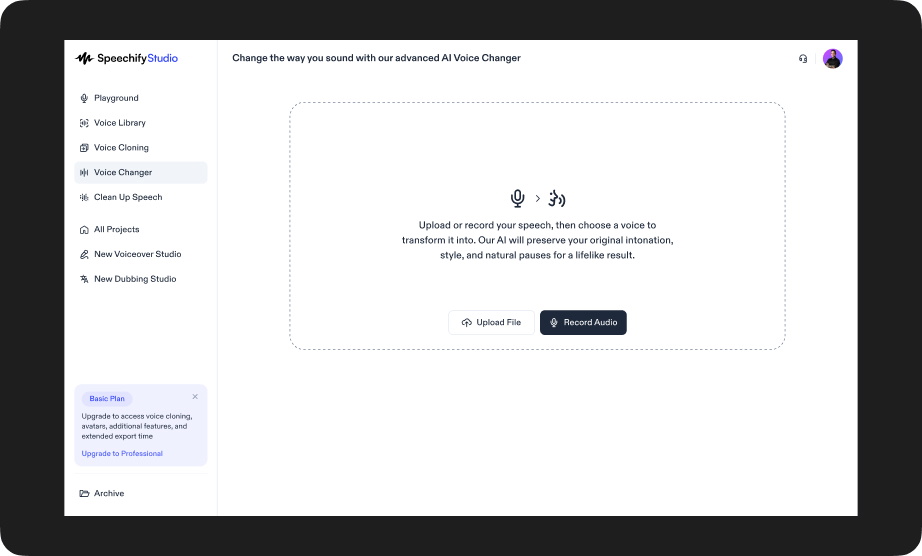
Speechify Studio Voice Changer
With Speechify Studio voice changer, you can convert any recorded or uploaded voice into one of over 1,000 lifelike AI voices. Covering a wide range of accents, genders, and vocal tones, this voice changer keeps the full expression and emotional nuance of the original performance intact. It’s perfect for anyone who wants to maintain acting quality while changing voices—ideal for storytellers, dubbing professionals, educators, and anyone who needs their voice work to sound both diverse and human.