

Na era digital, os vídeos se tornaram um dos principais formatos de conteúdo, especialmente nas redes sociais. O processo tradicional de edição de vídeo, frequentemente considerado demorado, foi revolucionado pela chegada do editor de vídeo com IA. Essa inovação oferece uma experiência intuitiva de criação, tornando todo o processo muito mais simples tanto para iniciantes quanto para profissionais.
O que é um Editor de Vídeo com IA?
Um editor de vídeo com IA utiliza inteligência artificial para agilizar o processo de edição. Diferente das ferramentas tradicionais, essas plataformas com tecnologia de IA analisam os clipes de vídeo, automatizam certos aspectos da edição e até sugerem melhorias. O resultado? Vídeos de alta qualidade produzidos com muito menos esforço.
Top 10 Usos do Editor de Vídeo com IA
- Criação de Conteúdo para Redes Sociais: Editores de vídeo com IA permitem que criadores de conteúdo produzam vídeos incríveis adaptados para diversas plataformas sociais, otimizando proporção de tela e recursos de edição conforme a necessidade de cada rede.
- Legendas Automatizadas e Transcrição: Por meio da IA, o conteúdo pode ser transcrito em tempo real, com legendas geradas e sincronizadas ao vídeo, ampliando a acessibilidade.
- Animações e Transições: Ferramentas com IA oferecem animações e transições personalizáveis, garantindo vídeos com aparência profissional sem necessidade de experiência avançada em edição.
- Conversão de Texto em Vídeo: Transforme conteúdos escritos em vídeos envolventes. O editor de vídeo com IA pode converter texto em fala, adicionar animações relevantes e até escolher a trilha sonora de fundo.
- Narração e Efeitos Sonoros: A IA pode identificar lacunas no roteiro do vídeo e adicionar narrações ou efeitos sonoros automaticamente, elevando a produção.
- Modelos de Vídeo e Fontes: Use modelos com IA e diversas opções de fontes e design para fazer seu conteúdo se destacar.
- Função de Chroma Key: Substitua fundos verdes por cenários personalizáveis, tornando a criação de vídeos mais versátil e independente de localização.
- Otimização de Clipes: A tecnologia de IA pode analisar os clipes, cortar conteúdos desnecessários e aprimorar a qualidade para uma melhor experiência do público.
- Edição em Tempo Real: Faça ajustes instantâneos durante a edição, recebendo sugestões geradas por IA.
- Avatares e Apresentadores Virtuais com IA: Crie avatares ou apresentadores virtuais para representar ou complementar o conteúdo principal, proporcionando uma experiência mais interativa ao público.
Criador de Vídeos com IA para TikTok
O TikTok, uma das principais redes sociais, agora conta com um criador de vídeos com IA. Essa ferramenta ajuda os usuários a produzirem conteúdo pensado para o público do TikTok. Com modelos intuitivos, animações geradas por IA e recursos de sincronização, ela simplifica o dia a dia dos criadores na plataforma.
Quanto Custa em Média um Editor de Vídeo com IA?
O preço de softwares de edição de vídeo com IA varia bastante. Alguns oferecem versões gratuitas com funcionalidades básicas, enquanto outros cobram mais caro por recursos avançados. Sempre compare recursos e preços para encontrar a melhor ferramenta com IA para você.
Como Usar IA para Editar Meu Vídeo?
- Faça upload dos clipes: Comece enviando seus vídeos brutos para a plataforma de edição com IA.
- Escolha modelos: Aproveite modelos com IA para criar a base do seu conteúdo.
- Aplique recursos de IA: Use ferramentas como transições, conversão de texto em vídeo e animações.
- Revise e ajuste: A IA sugerirá melhorias. Analise e faça os ajustes necessários.
- Exporte: Quando estiver satisfeito, exporte o novo vídeo para compartilhar ou refinar em plataformas como Adobe Premiere ou Premiere Pro.
Como Funciona a Edição de Vídeo com IA?
A edição de vídeo com IA utiliza inteligência artificial para analisar o conteúdo do vídeo. Ao reconhecer padrões, ela consegue automatizar várias tarefas, como transições, sincronização de narração e até otimização do conteúdo. Em comparação com a edição tradicional, as ferramentas com IA aceleram o fluxo de trabalho e elevam a qualidade final.
Para iniciantes, a maneira mais simples é aproveitar os tutoriais de edição oferecidos pelas ferramentas com IA. Esses tutoriais conduzem o usuário por cada etapa do processo, destacando os melhores recursos para garantir vídeos incríveis sem muita dificuldade.
Top 9 Editores de Vídeo com IA: Revelando o Futuro da Edição
Gerador de Vídeos com IA Speechify
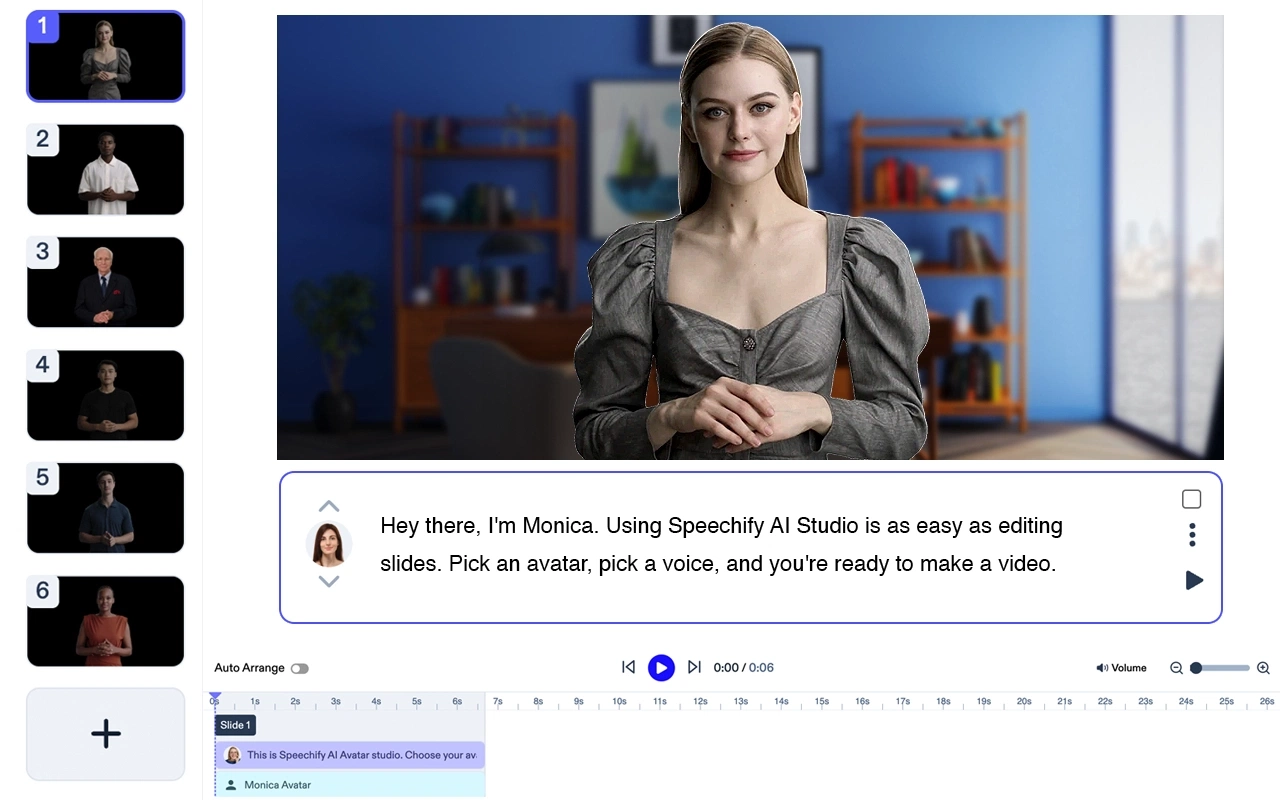
Preço: Gratuito para testar
Crie vídeos sofisticados sem precisar de atores ou equipamentos. Transforme qualquer texto em vídeos de alta qualidade com avatares e narrações gerados por IA – em menos de 5 minutos. Experimente o Gerador de Vídeos com IA Speechify.
Recursos do Speechify Avatar Generator
- Tudo o que você precisa é de um laptop
- Sem equipe. Você cria vídeos em minutos
- Use um ou vários avatares de IA sem custo adicional
- Receba seu vídeo em poucos minutos
- Pouca ou nenhuma edição. Curva de aprendizado zero.
O Speechify é claramente a melhor opção para gerar um avatar. Apesar de ser um produto independente e líder de categoria, ele também se integra perfeitamente à suíte Speechify Studio de produtos com IA para criadores. Experimente gratuitamente!
Descript
Originalmente criado para podcasts, o Descript se tornou um dos queridinhos entre criadores de conteúdo para produção de vídeos. Utilizando IA, ele simplifica a tarefa de transcrição, convertendo gravações em texto editável. O software também oferece função de conversão de texto em vídeo, permitindo criar vídeos impressionantes com efeitos sonoros sincronizados.
Custo: Varia de acordo com o plano.
Top 5 Recursos:
- Transcrição em tempo real.
- Conversão de texto em vídeo.
- Interface fácil de usar.
- Narrações geradas por IA.
- Modelos de vídeo personalizáveis.
Adobe Premiere Pro IA

A versão com IA do Adobe Premiere Pro potencializa criadores de conteúdo ao integrar inteligência artificial às ferramentas tradicionais de edição de vídeo. Essa combinação garante um fluxo de trabalho aprimorado e vídeos de alta qualidade, otimizados para várias redes sociais.
Custo: Os valores variam, com opções de assinatura mensal.
Top 5 Recursos:
- Transições turbinadas por IA.
- Função de chroma key (fundo verde).
- Sincronização de narração.
- Modelos de vídeo com tecnologia IA.
- Experiência de edição profissional.
Magisto
O Magisto oferece um editor de vídeos com IA que simplifica a criação de conteúdo para redes sociais. Ele analisa clipes automaticamente, selecionando os melhores trechos e aplicando transições com tecnologia IA para resultados profissionais.
Custo: De opções gratuitas a assinaturas premium.
Top 5 Recursos:
- Geração de vídeos com IA.
- Modelos personalizáveis.
- Seleção de música de fundo.
- Edição para diferentes proporções de tela.
- Otimização para redes sociais.
FilmoraPro IA
Unindo o poder do Filmora à inteligência artificial, o FilmoraPro IA oferece ferramentas de edição intuitivas para iniciantes e profissionais. A IA ajuda a detectar partes desnecessárias, garantindo vídeos dinâmicos e envolventes.
Custo: Baseado em assinatura, com testes grátis disponíveis.
Top 5 Recursos:
- Detecção e remoção de partes irrelevantes.
- Animações com aprimoramento por IA.
- Tutoriais fáceis de acompanhar.
- Recursos de edição em tempo real.
- Efeitos sonoros avançados.
Kapwing

O editor de vídeo com IA do Kapwing foi desenvolvido para criadores de conteúdo modernos. Seus recursos otimizam vídeos para TikTok e outras plataformas, aumentando o engajamento com animações e apresentadores virtuais gerados por IA.
Custo: Oferece versões gratuitas e premium.
Top 5 Recursos:
- Modelos de vídeo com IA.
- Otimização para TikTok.
- Geração e sincronização de legendas.
- Avatares com IA.
- Personalização de fontes.
Lumen5

Reconhecido por transformar textos em vídeos, o Lumen5 utiliza IA para converter conteúdos escritos em vídeo. Ideal para transformar blogs ou artigos em materiais atrativos para redes sociais.
Custo: Planos variam de gratuitos a corporativos.
Top 5 Recursos:
- Transformação de texto em vídeo.
- Modelos de vídeo guiados por IA.
- Otimização de conteúdo para redes sociais.
- Animações personalizáveis.
- Geração de narração com IA.
Clipchamp

O Clipchamp é um criador de vídeos com IA focado na experiência do usuário. Oferece ferramentas intuitivas e recursos que facilitam a edição, gerando vídeos prontos para redes sociais.
Custo: Tem modelo freemium com opções premium variáveis.
Top 5 Recursos:
- Interface amigável.
- Seleção aprimorada de clipes por IA.
- Modelos para diversas plataformas.
- Transições e animações.
- Feedback e edição em tempo real.
InVideo
Ferramenta famosa por gerar vídeos com IA para marketing de conteúdo, o InVideo oferece uma gama de recursos que facilitam a criação. Com sugestões inteligentes e uma ampla biblioteca de modelos, os vídeos ganham aparência profissional e atraente.
Custo: Planos de assinatura mensal e anual disponíveis.
Top 5 Recursos:
- Grande biblioteca de modelos.
- Sugestões de edição por IA.
- Conversão de texto em fala.
- Transições personalizáveis.
- Otimização de vídeos para redes sociais.
Cada um desses editores de vídeo com IA utiliza o poder da inteligência artificial para redefinir o processo de edição. Com a evolução contínua da IA, podemos esperar ainda mais avanços, simplificando cada vez mais a jornada de criação para produtores de conteúdo.




