

O que é um Modificador de Voz?
Um modificador de voz, frequentemente chamado de alterador ou modulador de voz, é um software que permite alterar sua voz em tempo real. Ele pode transformar sua voz para soar como diferentes personagens, gêneros ou até adicionar efeitos como reverberação ou mudança de tom. Essa tecnologia ganhou espaço em diversas áreas, desde dublagens profissionais até ligações de trote e brincadeiras entre amigos.
Como Funciona?
Softwares de alteração de voz utilizam algoritmos avançados e IA para modificar o tom, o timbre e a altura da sua voz. As capacidades de alterador de voz com IA permitem clonar vozes, podendo replicar uma voz específica ou criar vozes totalmente novas. Essas aplicações também filtram ruídos de fundo e aplicam efeitos de áudio para garantir alta qualidade no resultado final.
Aplicações e Usos
- Criação de Conteúdo: Criadores de conteúdo em plataformas como TikTok, YouTube e Twitch utilizam modificadores de voz para criar conteúdos envolventes e originais. Seja para dublagens em vídeos, criação de personagens ou inserção de efeitos dramáticos, as possibilidades são praticamente infinitas.
- Jogos: Jogadores usam modificadores de voz em jogos como Fortnite e Minecraft para deixar as partidas mais divertidas ou manter o anonimato. Ferramentas como o Voicemod oferecem soundboards com vários efeitos, facilitando a troca de voz durante as jogatinas.
- Podcasts e Audiolivros: Podcasters e narradores de audiolivros usam modificadores de voz para interpretar vários personagens sem necessidade de outros locutores. Isso reduz custos e garante maior controle na produção.
- Transmissões ao Vivo e Reuniões: Na era do trabalho remoto, modificadores de voz em tempo real se tornaram populares em reuniões virtuais em plataformas como Zoom e Skype. Eles adicionam um toque divertido às reuniões do dia a dia e podem ser usados para simulações ou contação de histórias.
- Redes Sociais e Mensagens: Aplicativos como WhatsApp e Discord dão suporte a modificadores de voz, permitindo que usuários enviem mensagens de voz ou conversem usando vozes diferentes, dando um toque pessoal e criativo às interações.
Como Escolher um Modificador de Voz
Ao escolher um modificador de voz, leve em conta os seguintes pontos:
- Compatibilidade: Certifique-se de que o software é compatível com seu sistema operacional (Windows, Mac, iOS).
- Processamento em tempo real: Procure um modificador de voz que funcione em tempo real para uso ao vivo.
- Filtros e efeitos de voz: Os melhores programas oferecem uma ampla variedade de filtros e efeitos para escolher.
- Facilidade de uso: Interface intuitiva, com controles simples e tutoriais.
- Qualidade: Som de alta qualidade e com atraso mínimo.
- Personalização: Capacidade de criar e salvar vozes personalizadas.
- Custo: Existem opções gratuitas e pagas. Dê preferência a uma gratuita se estiver apenas começando.
Softwares Populares de Modificação de Voz
Confira algumas das melhores opções de softwares modificadores de voz disponíveis:
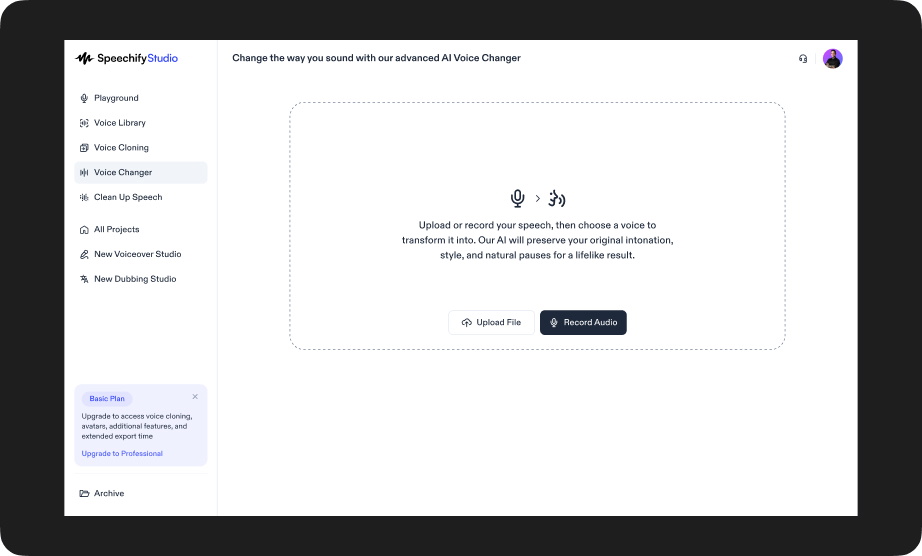
- Speechify Studio: Permite aos usuários enviar ou gravar voz e convertê-la instantaneamente em mais de 1.000 vozes de IA realistas, mantendo o tom, o ritmo e a emoção do locutor original.
- Voicemod: Um dos favoritos entre gamers e streamers, o Voicemod oferece uma vasta gama de efeitos de áudio e modulação de voz em tempo real.
- Clownfish Voice Changer: Uma opção gratuita e versátil para Windows, compatível com várias plataformas como Discord, Skype e Steam.
- MorphVOX: Conhecido por sua alta qualidade na transformação de voz, o MorphVOX é ideal para uso profissional em podcasts e dublagens.
- Voxal Voice Changer: Suporta múltiplos formatos (wav, mp3) e é compatível tanto com Windows quanto com Mac.
Como Começar com Modificadores de Voz
Confira um passo a passo rápido de como usar um modificador de voz:
- Baixe e instale: Escolha seu app de modificação de voz preferido e instale-o no seu dispositivo.
- Configure seu microfone: Certifique-se de que o microfone está corretamente conectado e reconhecido pelo software.
- Selecione uma voz ou efeito: Navegue pelos filtros de voz disponíveis e escolha o que melhor se encaixa na sua necessidade.
- Teste e ajuste: Teste sua nova voz e ajuste configurações como tom, timbre e efeitos para obter o resultado desejado.
- Comece a usar: Aplique o modificador em aplicativos como Discord, Zoom ou softwares de transmissão ao vivo.
Modificador de Voz Speechify Studio
Speechify Studio voice changer oferece um novo nível de liberdade criativa para produtores de conteúdo, permitindo que os usuários enviem ou gravem sua própria fala e convertam em mais de 1.000 vozes geradas por IA incrivelmente realistas. De sotaques regionais a perfis vocais masculinos e femininos distintos, a ferramenta preserva o tom emocional, o ritmo e a entrega da voz original. Isso a torna especialmente valiosa para situações em que a performance vocal é fundamental — como narração de audiolivros, animação, dublagem de vídeos ou produção de podcasts.
FAQ
Posso usar um modificador de voz em dispositivos móveis?
Sim, muitos modificadores de voz, como Voicemod e Clownfish, possuem versões para iOS e Android.
O software de alteração de voz é seguro?
Sim, desde que você baixe de fontes confiáveis e siga boas práticas de segurança digital.
Modificadores de voz conseguem eliminar ruído de fundo?
Muitos modificadores de voz avançados contam com recursos de redução de ruído para garantir um áudio limpo.
Modificadores de voz são legais?
Sim, mas usá-los para enganar ou prejudicar outras pessoas pode ser ilegal e antiético.
Posso criar meus próprios efeitos de voz?
Com certeza! Muitos modificadores de voz permitem personalização avançada e até clonagem de voz.
A tecnologia de modificação de voz abre um mundo de possibilidades para gamers, criadores de conteúdo e qualquer pessoa que queira dar um toque criativo às suas comunicações de áudio. Com as ferramentas certas e um pouco de prática, você pode transformar sua voz em praticamente qualquer coisa que imaginar. Então, por que não experimentar e explorar toda a diversão e versatilidade da modificação de voz?




