

Um avatar de voz, frequentemente chamado de avatar falante ou avatar digital, é uma representação gráfica de uma pessoa que pode produzir fala semelhante à humana usando tecnologia de IA. Diferente de um robô falante, um avatar de voz não interage autonomamente, mas depende do input fornecido pelo usuário, geralmente por meio de tecnologia de texto para fala.
Criar e usar um avatar de voz pode deixar seus vídeos mais envolventes e acrescentar conteúdo audiovisual às suas redes sociais, apresentações em PowerPoint e outras plataformas, ajudando você a transmitir mensagens de forma mais personalizada e atraente.
Como criar um avatar de voz?
- Escolha um app ou software adequado: Existem inúmeros aplicativos e softwares disponíveis tanto para iOS quanto para Android que permitem criar um avatar personalizado. Essas plataformas costumam oferecer uma grande variedade de templates, visuais e opções para desenhar avatares completos ou apenas o rosto. O Speechify Video é um desses softwares.
- Desenhe seu avatar: Comece selecionando as características físicas do seu avatar, como penteado e expressões faciais. A maioria dos aplicativos permite criar um avatar baseado em você mesmo, usando uma webcam ou fazendo upload de uma foto.
- Adicione dublagem: Com o visual do avatar criado, o próximo passo é adicionar a voz. Isso geralmente pode ser feito de duas formas: usando sua própria voz por meio de gravações de áudio ou utilizando a síntese de voz por IA, em que você insere o texto e o software gera a fala correspondente em tempo real.
- Edite e refine: Por fim, você pode ajustar seu avatar com as ferramentas de edição de vídeo fornecidas pelo software. Esses recursos podem incluir opções para adicionar transições, legendas e outros elementos visuais.
Avatar falante é grátis?
Embora algumas ferramentas de criação de avatar ofereçam versões gratuitas, elas geralmente apresentam limitações, como marcas d'água ou menos funcionalidades. Para acesso a recursos de alta qualidade e uso irrestrito, a maior parte das plataformas funciona com modelos de assinatura paga.
Posso criar um avatar de mim mesmo?
Com certeza! Usando uma webcam, a maioria das ferramentas de criação de avatar permite criar um avatar digital parecido com a sua aparência. Além disso, utilizando sua própria voz, é possível fazer com que o seu avatar soe como você.
Qual app posso usar para criar um avatar falante?
Existem inúmeros aplicativos disponíveis para criar um avatar falante. Alguns dos mais bem avaliados incluem:
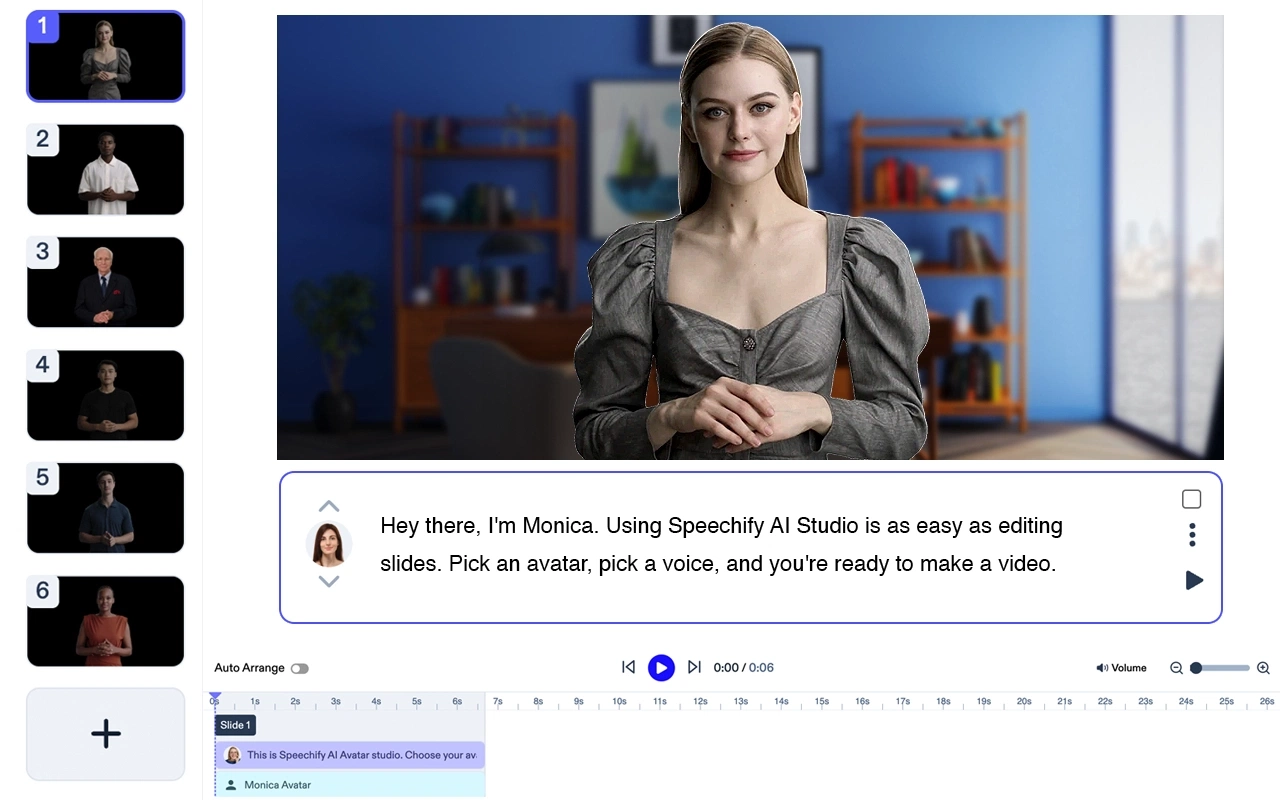
1. Speechify Video: Este é um dos aplicativos mais recentes, mas já vem completo e é bem fácil de usar para qualquer pessoa.

2. Synthesia: Esta plataforma de vídeo com IA permite criar avatares humanos realistas e editar conteúdos em vídeo.

3. SitePal: Este app permite criar avatares falantes para websites, oferecendo tanto avatares de acervo customizáveis quanto a opção de fazer upload dos seus próprios.

4. Voki: O Voki é uma ferramenta voltada para educação, permitindo criar personagens falantes capazes de apresentar aulas ou apresentações de forma interativa.

5. Animaker: Este aplicativo permite criar avatares, adicionar dublagem e personalizar expressões faciais.

6. FaceRig: O FaceRig usa rastreamento facial em tempo real, através da sua webcam, para transformar você em um avatar digital.
7. TALKING AVATAR CREATOR: Este app para Android permite criar um avatar falante a partir de fotos, adicionar dublagem e compartilhar nas redes sociais.

8. My Talking Avatar: Um app para iOS que permite criar seu próprio avatar falante com recursos faciais e roupas customizáveis.

9. Morph3D: Esta plataforma permite criar avatares de corpo inteiro com amplas opções de personalização.
Lembre-se de verificar o modelo de preços de cada plataforma, pois algumas podem oferecer uma versão gratuita limitada, enquanto outras exigem assinatura paga.
O que é um avatar de voz?
Um avatar de voz, também chamado de avatar falante, é uma representação digital de uma pessoa capaz de produzir fala. Essa fala pode ser pré-gravada ou gerada em tempo real por meio de tecnologia de texto para fala. O visual do avatar pode variar de um personagem 2D simples a uma figura 3D completa, com expressões faciais e movimentos.
Como usar um avatar falante?
Depois de criar seu avatar falante, é relativamente fácil utilizá-lo. Normalmente, o processo envolve:
- Adicionar um diálogo: digite o texto que você quer que o avatar diga ou, em alguns casos, grave sua própria voz.
- Selecionar animações: algumas plataformas oferecem a opção de escolher gestos, expressões ou movimentos específicos para seu avatar enquanto ele fala.
- Publicar ou compartilhar: você pode incorporar seu avatar em seu site, compartilhar nas redes sociais, usar em vídeos ou integrar em apresentações digitais.
Lembre-se de que cada plataforma pode ter seu próprio processo específico, então sempre consulte os tutoriais ou guias do aplicativo para instruções detalhadas.
Quais são algumas utilidades para um avatar de voz?
Os avatares de voz oferecem inúmeras possibilidades para criatividade e comunicação. É possível utilizá-los para criar conteúdos em vídeo envolventes para redes sociais, apresentações em vídeo e tutoriais. No contexto empresarial, podem ser usados em atendimentos ao cliente ou para responder perguntas frequentes de forma interativa e personalizada.
Qual a diferença entre um avatar falante e um robô falante?
Um robô falante é uma entidade física ou virtual alimentada por inteligência artificial que pode conversar com pessoas em tempo real, geralmente de forma autônoma. Já o avatar falante é uma representação digital controlada pelo usuário, seja por mensagens pré-gravadas ou software de texto para fala.
Como faço um avatar de voz para o meu celular?
Criar um avatar de voz para seu celular é um processo simples. Muitas ferramentas de criação de avatar estão disponíveis como aplicativos tanto para Android quanto iOS. Basta fazer o download do app, seguir os tutoriais e começar a criar seu próprio avatar personalizado.




