
1. Начало
  2. Speechify за уеб
  3. How can I import my files to Speechify on a computer?
Speechify за уеб

How can I import my files to Speechify on a computer?

Cliff Weitzman

Клиф Вайцман

Главен изпълнителен директор и основател на Speechify

apple logoApple Design Award 2025
50M+ потребители

Use the web app to import your files and other content on your PC, laptop or desktop

You can easily access your Speechify library on the web using a PC, desktop or laptop and also add files directly to your Speechify library on the web app.

  1. Go to app.speechify.com, preferably using a Chromium browser.
  2. Sign in using your Speechify credentials.
  3. The home page is your Speechify account library,
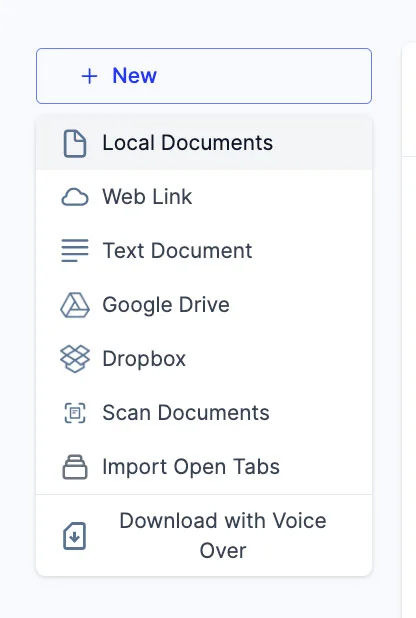
  4. You can add new files to your library by clicking on the '+ New' button on the left side of the screen.
  5. This option allows you to import various files and documents directly into your Speechify library.
    1. Local Documents: Add any PDF files located locally on your computer, PC or desktop.
    2. Web Link: Just copy and paste and web link or URL that you want to add to your library. Please note that password or paywall-protected links might not work.
    3. Text Document: You can copy and directly paste any content into the Speechify library using this option.
    4. Google Drive: Connect your Google Drive to your Speechify library and directly import any documents.
    5. Dropbox: Connect your Dropbox drive to your Speechify library and directly import any documents.
    6. Scan Documents: This option redirects you to the phone app (iOS or Android) so that you can use your phone camera to scan any physical documents directly with the Speechify app.
    7. Import Open Tabs: This option lets you import any open tab in your browser directly into your Speechify library.
    8. Download with Voice Over: Voice over is a separate offering by Speechify that lets you create and download voiceovers and audio files. You can try the Voiceover product for free but the download option is only available with the paid Voiceover subscription, which is not included in the Speechify Text-to-Speech premium plan. This option will redirect you to the Voiceover webpage.

Възползвайте се от най-напредналите AI гласове, неограничени файлове и 24/7 поддръжка

Пробвайте безплатно
tts banner for blog

Споделете тази статия

Cliff Weitzman

Клиф Вайцман

Главен изпълнителен директор и основател на Speechify

Клиф Вайцман е застъпник за хора с дислексия и е главен изпълнителен директор и основател на Speechify — приложението номер 1 в света за преобразуване на текст в реч, с над 100 000 петзвездни отзива и първо място в App Store в категорията „Новини и списания“. През 2017 г. Вайцман е включен в престижния списък Forbes 30 под 30 за приноса си към това интернет да бъде по-достъпен за хора с обучителни затруднения. Клиф Вайцман е представян в EdSurge, Inc., PC Mag, Entrepreneur, Mashable и много други водещи медии.

speechify logo

За Speechify

#1 четец за текст към реч

Speechify е водещата в света платформа за текст към реч, на която се доверяват над 50 милиона потребители и която има повече от 500 000 петзвездни отзива за своите приложения за текст към реч за iOS, Android, разширение за Chrome, уеб приложение и настолно приложение за Mac. През 2025 година Apple отличи Speechify с престижната Apple Design Award на WWDC, определяйки я като „ключов ресурс, който помага на хората да живеят по-добре“. Speechify предлага над 1000 естествено звучащи гласа на над 60 езика и се използва в близо 200 държави. Сред известните гласове са Snoop Dogg и Гуинет Полтроу. За създатели и бизнеси Speechify Studio предоставя напреднали инструменти, включително AI генератор на гласове, AI клониране на глас, AI дублаж и AI променящ глас. Speechify също задвижва водещи продукти със своето висококачествено и достъпно като цена API за текст към реч. Представено в The Wall Street Journal, CNBC, Forbes, TechCrunch и други водещи медии, Speechify е най-големият доставчик на услуги за текст към реч в света. Посетете speechify.com/news, speechify.com/blog и speechify.com/press, за да научите повече.


