

In the world of digital creativity, the Collage Generator has emerged as a revolutionary tool that allows users to merge their memories and aesthetic sense into stunning photo collages. This innovative tool provides a plethora of options such as various collage templates, editing tools, and customization options to create a beautiful photo collage that perfectly captures the essence of your memories.
What is Collage Generator?
A Collage Generator is a tool that lets you create beautiful photo collages by combining multiple pictures into a single, cohesive design. With a range of collage templates, design elements, fonts, and photo editing tools at your disposal, you can customize your collage to your heart's content. Some Collage Generators also allow you to add doodles, stickers, and text to add a personal touch to your creation.
Top Use Cases of Collage Generator:
- Memory Preservation: Create a beautiful photo collage of your favorite memories, be it a wedding, birthday, or vacation.
- Social Media Posts: Design stunning collages for your Instagram posts and stories.
- Gifts: Craft personalized photo collages as gifts for your loved ones.
- Event Invitations: Utilize collage templates to design trendy invitations for events and parties.
- Business Promotions: Incorporate your brand's theme and create collages for business promotions.
- Educational Projects: Bring your projects to the next level with informative and visually appealing collages.
- Mood Boards: Collate images and elements to create mood boards for your creative projects.
- Graphic Design: Use the collage generator as a graphic design tool to create visuals for your website or blog.
- Home Decor: Print high-resolution photo collages and use them as unique pieces of home decor.
- Scrapbooking: Digitally create scrapbook pages using the collage maker.
How to Make a Collage with AI:
Utilizing AI in Collage Generators can significantly enhance the process of making collages. Simply upload your photos, and the AI will analyze them to suggest the best collage layouts and design elements that will complement your pictures. Some tools even have background removers and other advanced features to take your collage to the next level.
How to Make a Video Collage:
Video collages are a trendy way to showcase your memories. To make a video collage, select a collage app or tool that supports video files. Upload your video clips and arrange them in your desired layout. Customize the collage with text, stickers, and other elements before saving and sharing it.
How to Create Collages from Smartphone:
Many Collage Generator tools offer mobile apps for both iPhone and Android devices. Simply download the app, upload your photos, and start creating your collage using the various editing tools and collage templates available. Some apps also offer tutorials to help you make the most out of the app's features.
How to Make a Collage of Pictures:
Making a collage of pictures is easy with a Collage Generator. Start by selecting your desired collage template or layout. Upload your pictures and arrange them according to your preference. Customize the collage with text, stickers, and other design elements. Once you are satisfied with the design, save and share your beautiful photo collage.
How to Make a Photo Collage on a Computer:
To make a photo collage on a computer, choose a Collage Generator tool that is compatible with your operating system. Upload your pictures and select a collage template. Customize the collage by adding text, stickers, fonts, and other design elements. Save your stunning photo collage in high resolution and share it with your friends and family.
Top AI Collage Generators:
Speechify Studio
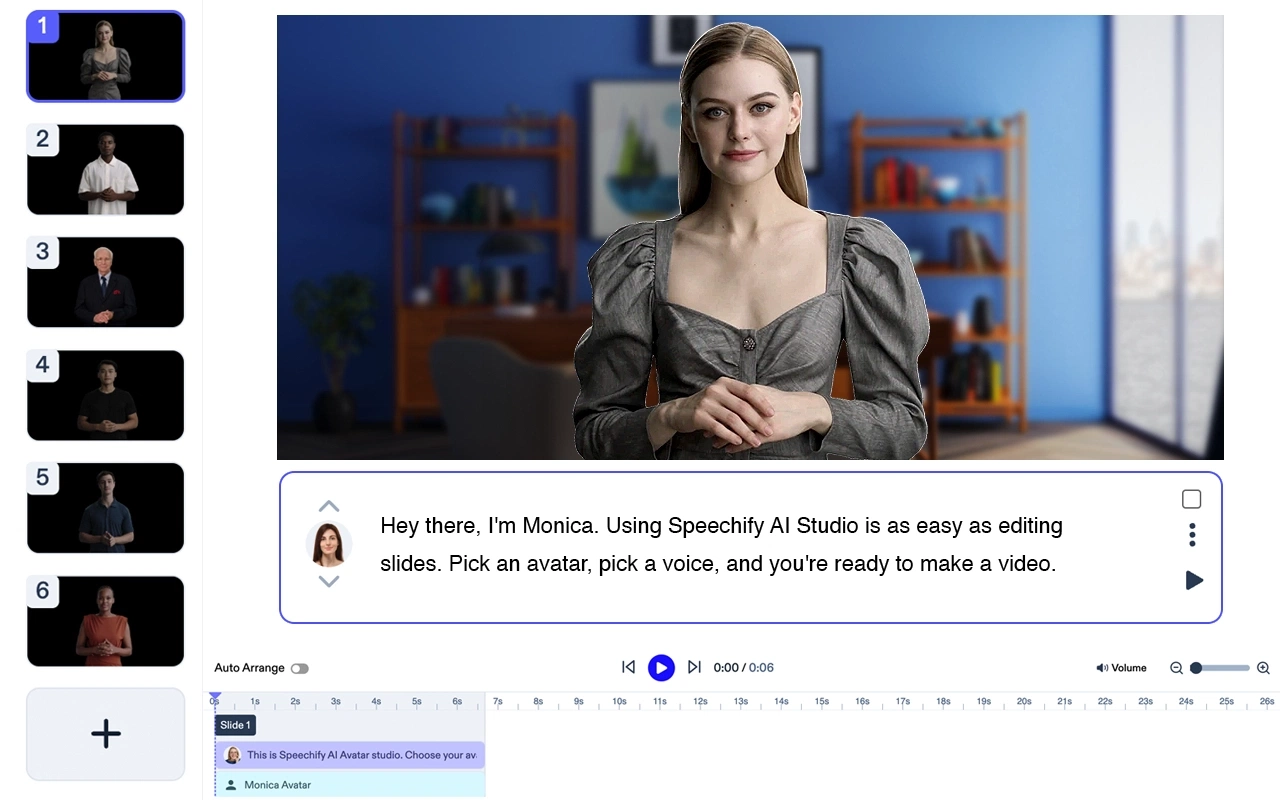
Pricing: Free to try
Speechify Studio is a comprehensive creative AI suite for individuals and teams. Create stunning AI videos from text prompts, add voice overs, background music and free stock images. All your projects are free to use for personal or commercial use.
Top Features: Templates, text to video, real-time editing, resizing, transcription, video marketing tools.
Speechify is clearly the best option for your generated avatar videos. By itself it is a great product on its own, but it also provides seamless integration with the Speechify Studio suite of AI products for creators. Perfect for teams of all sizes.
Canva:
Canva is a popular online photo collage maker with a range of collage templates, fonts, and design elements. The tool also offers AI-driven features such as background remover and photo effects.
Cost: Free with optional paid features
Top 5 Features:
- User-friendly interface
- Extensive range of collage templates
- AI-driven photo editing tools
- High-quality downloads
- Collaboration features
Fotor:
Fotor is a versatile photo editor and collage maker with a range of features such as photo effects, stickers, and collage layouts. The tool also offers AI-powered features such as photo enhancement.
Cost: Free with optional paid features
Top 5 Features:
- Wide range of photo effects
- AI-powered photo enhancement
- Variety of collage layouts
- Stickers and text options
- High-resolution downloads
PicCollage:
PicCollage is a user-friendly collage app that allows you to create beautiful photo collages with ease. The app offers a range of collage layouts, stickers, and fonts to customize your creation.
Cost: Free with in-app purchases
Top 5 Features:
- Intuitive interface
- Wide range of collage layouts
- Extensive sticker library
- Variety of fonts
- High-resolution downloads
Adobe Spark:
Adobe Spark is a powerful graphic design tool that allows you to create stunning photo collages with professional-quality results. The tool offers a range of collage templates, fonts, and design elements to choose from.
Cost: Free with optional paid features
Top 5 Features:
- Professional-quality results
- Extensive range of collage templates
- Variety of fonts and design elements
- High-resolution downloads
- Integration with other Adobe Creative Cloud apps
PhotoGrid:
PhotoGrid is a comprehensive photo editor and collage maker that offers a range of features such as collage layouts, stickers, and fonts. The tool also offers AI-driven features such as smart cropping and photo effects.
Cost: Free with in-app purchases
Top 5 Features:
- Wide range of collage layouts
- Smart cropping and photo effects
- Extensive sticker library
- Variety of fonts
- High-resolution downloads
PicsArt:
PicsArt is a popular photo editor and collage maker with a range of features such as collage layouts, stickers, and fonts. The tool also offers AI-powered features such as background remover and photo effects.
Cost: Free with optional paid features
Top 5 Features:
- Intuitive interface
- Wide range of collage layouts
- AI-powered background remover
- Extensive sticker library
- Variety of fonts
Ribbet:
Ribbet is a versatile photo editor and collage maker with a range of features such as collage layouts, stickers, and fonts. The tool also offers AI-powered features such as background remover and photo effects.
Cost: Free with optional paid features
Top 5 Features:
- Intuitive interface
- Wide range of collage layouts
- AI-powered background remover
- Extensive sticker library
- Variety of fonts
Crello:

Crello is a user-friendly graphic design tool that allows you to create stunning photo collages with ease. The tool offers a range of collage templates, fonts, and design elements to customize your creation.
Cost: Free with optional paid features
Top 5 Features:
- User-friendly interface
- Extensive range of collage templates
- Variety of fonts and design elements
- High-resolution downloads
- Collaboration features
BeFunky:
BeFunky is a powerful photo editor and collage maker with a range of features such as collage layouts, stickers, and fonts. The tool also offers AI-driven features such as photo effects and smart cropping.
Cost: Free with optional paid features
Top 5 Features:
- Intuitive interface
- Wide range of collage layouts
- AI-driven photo effects
- Extensive sticker library
- Variety of fonts
FAQs:
What is the best free collage maker online?
Canva and Fotor are two of the best free online collage makers that offer a range of features and customization options.
Is there a totally free collage maker?
Yes, there are several totally free collage makers available online, such as Canva and Fotor, which offer a range of features for creating stunning photo collages.
How to make a free collage online?
You can use free online collage makers such as Canva and Fotor. Simply upload your photos, choose a collage template, customize it with text, stickers, and other elements, and then download your creation.




