

What is a Voice Modificator?
A voice modificator, often referred to as a voice changer or voice modulator, is a software application that allows you to alter your voice in real-time. It can transform your voice to sound like different characters, genders, or even add voice effects like reverb or pitch shift. This technology has found its place in various areas, from professional voiceovers to casual prank calls.
How Does It Work?
Voice changing software uses advanced algorithms and AI to modify the pitch, tone, and timbre of your voice. The AI voice changer capabilities allow for voice cloning, which can replicate a specific voice or create entirely new voices. These applications can filter out background noise and apply audio effects to ensure a high-quality output.
Applications and Use Cases
- Content Creation: Content creators on platforms like TikTok, YouTube, and Twitch use voice changers to create engaging and unique content. Whether it’s for voiceovers in videos, creating different characters, or adding dramatic sound effects, the possibilities are endless.
- Gaming: Gamers use voice changers in games like Fortnite and Minecraft to add an extra layer of fun or anonymity. Tools like Voicemod offer a soundboard with various presets, making it easy to switch voices during gameplay.
- Podcasts and Audiobooks: For podcasters and audiobook narrators, voice changers provide a way to voice multiple characters without needing additional talent. This not only saves costs but also allows for a more controlled production process.
- Live Streaming and Meetings: In the era of remote work, real-time voice changers have become popular in virtual meetings on platforms like Zoom and Skype. They add a fun element to otherwise mundane meetings and can be used for role-playing or storytelling.
- Social Media and Messaging: Apps like WhatsApp and Discord support voice changers, allowing users to send voice messages or chat in different voices, adding a personal touch to their interactions.
Choosing the Right Voice Modificator
When selecting a voice changer, consider the following:
- Compatibility: Ensure the software is compatible with your operating system (Windows, Mac, iOS).
- Real-time Processing: Look for a real-time voice changer for live applications.
- Voice Filters and Effects: The best voice changers offer a wide range of voice filters and effects to choose from.
- Ease of Use: A user-friendly interface with simple controls and tutorials.
- Quality: High-quality voice sound and minimal lag.
- Customization: Ability to create and save custom voices.
- Cost: Options range from free to premium. Look for a free voice changer if you’re just starting.
Popular Voice Changer Software
Here are some of the best voice changer software options available:
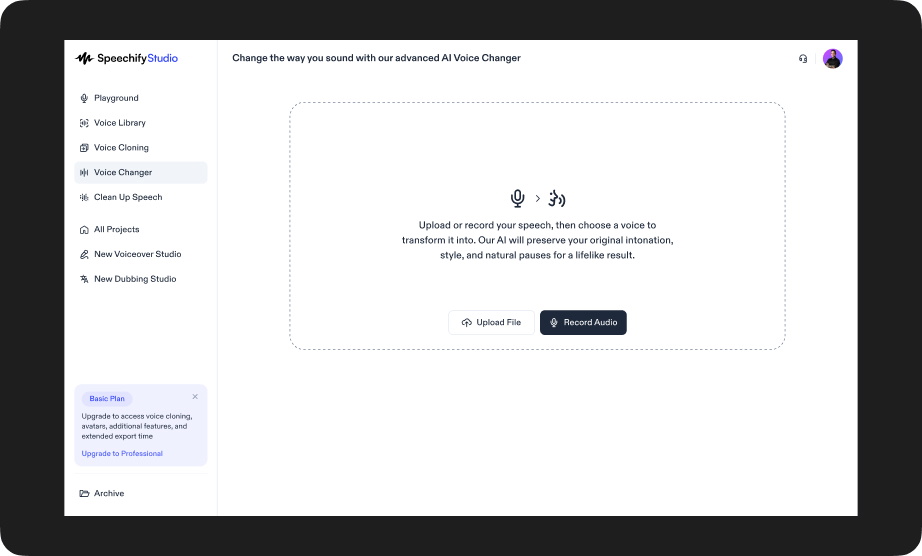
- Speechify Studio: Allows users to upload or record speech and instantly convert it into one of over 1,000 lifelike AI voices while maintaining the tone, pacing, and emotion of the original speaker.
- Voicemod: A favorite among gamers and streamers, Voicemod offers a vast array of audio effects and real-time voice modulation.
- Clownfish Voice Changer: A versatile and free option for Windows users, it supports various platforms like Discord, Skype, and Steam.
- MorphVOX: Known for its high-quality voice transformation, MorphVOX is ideal for professional use in podcasts and voiceovers.
- Voxal Voice Changer: Supports multiple formats (wav, mp3) and is compatible with both Windows and Mac.
Getting Started with Voice Modulation
Here’s a quick tutorial on how to use a voice changer:
- Download and Install: Choose your preferred voice changer app and install it on your device.
- Set Up Your Microphone: Ensure your microphone is properly set up and recognized by the software.
- Select a Voice or Effect: Browse through the available voice filters and select one that suits your needs.
- Test and Adjust: Test your new voice and adjust settings like pitch, timbre, and sound effects to get the desired output.
- Start Using: Apply the voice changer in your favorite applications like Discord, Zoom, or your live streaming software.
Speechify Studio Voice Changer
Speechify Studio voice changer offers a new level of creative freedom for content creators, allowing users to upload or record their own speech and convert it into one of over 1,000 lifelike AI-generated voices. From regional accents to distinct male and female vocal profiles, the tool preserves the emotional tone, pacing, and delivery of the original voice. This makes it especially valuable for scenarios where vocal performance matters—like audiobook narration, animation, video dubbing, or podcast production.
FAQ
Can I use a voice changer on mobile devices?
Yes, many voice changers like Voicemod and Clownfish have mobile versions for iOS and Android.
Is voice changing software safe?
Yes, as long as you download from reputable sources and follow basic cybersecurity practices.
Can voice changers eliminate background noise?
Many advanced voice changers come with noise reduction features to ensure clear audio.
Are voice changers legal?
Yes, but using them to deceive or harm others can be illegal and unethical.
Can I create my own voice effects?
Absolutely! Many voice changers allow for extensive customization and even voice cloning.
Voice modification technology opens up a world of possibilities for gamers, content creators, and anyone looking to add a creative twist to their audio communications. With the right tools and a bit of practice, you can transform your voice into almost anything you can imagine. So, why not give it a try and explore the fun and versatility of voice changing?




