



Seja você um cineasta, criador de conteúdo ou profissional de marketing que deseja alcançar um público maior e ir além das barreiras linguísticas, este guia vai te acompanhar em cada etapa do processo de dublagem. Desde a escolha da voz de IA ideal até o ajuste fino do áudio final, o Speechify Studio oferece uma solução prática e eficiente para dar vida aos seus projetos em vários idiomas. Pronto para começar? Vamos descobrir como o Speechify Studio pode turbinar o seu conteúdo e encantar uma audiência global.
Como Iniciar um Novo Projeto de Dublagem no Speechify Studio
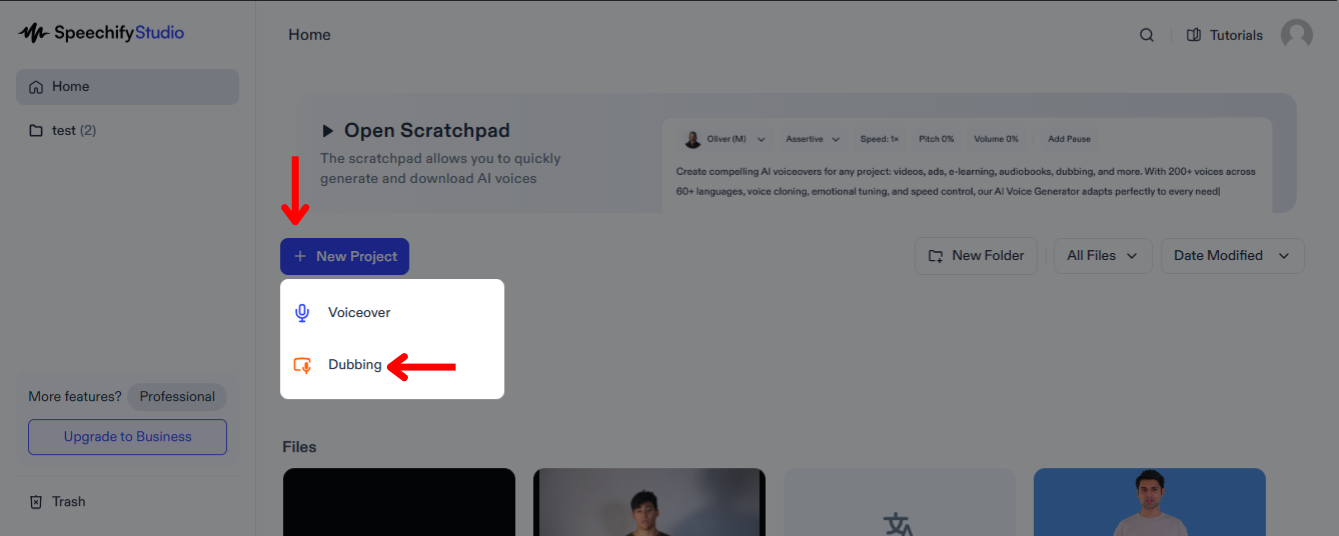
Dublar seus vídeos pode ampliar significativamente o alcance do seu conteúdo, permitindo que pessoas de diferentes origens linguísticas se conectem com ele no próprio idioma. Para começar:
- Clique em “Novo Projeto” na tela inicial.
- Escolha “Dublagem”.
Como Enviar Arquivos no Dublador do Speechify Studio
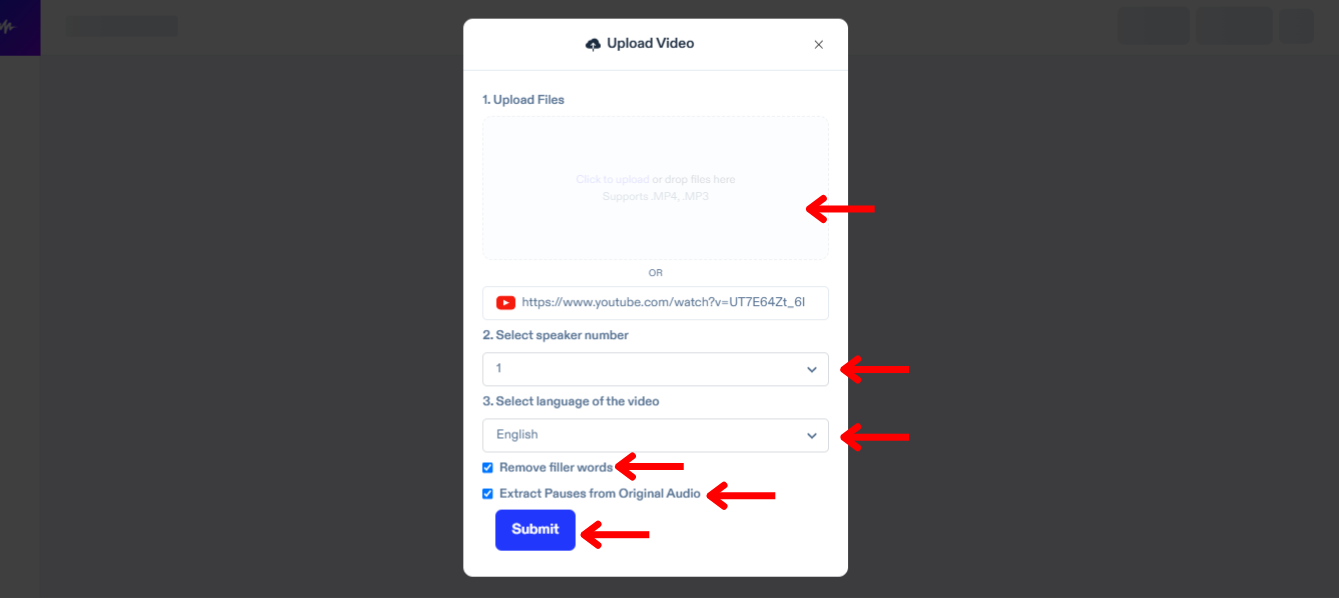
O primeiro passo para dublar é enviar o arquivo que você deseja traduzir e dublar. Para isso, faça o seguinte:
- Toque em "Importar".
- Envie os arquivos ou cole um link do YouTube.
- Selecione quantos locutores há no seu vídeo.
- Escolha o idioma original do seu vídeo.
- Marque “Remover Palavras de Apoio” para eliminar muletas como “é...” ou “tipo”.
- Clique em “Extrair Pausas do Áudio Original” para garantir que sua dublagem soe natural.
- Toque em “Enviar” e o Speechify Dubbing vai transcrever automaticamente seu vídeo no idioma atual.
Como Editar a Transcrição Automática no Dublador do Speechify Studio
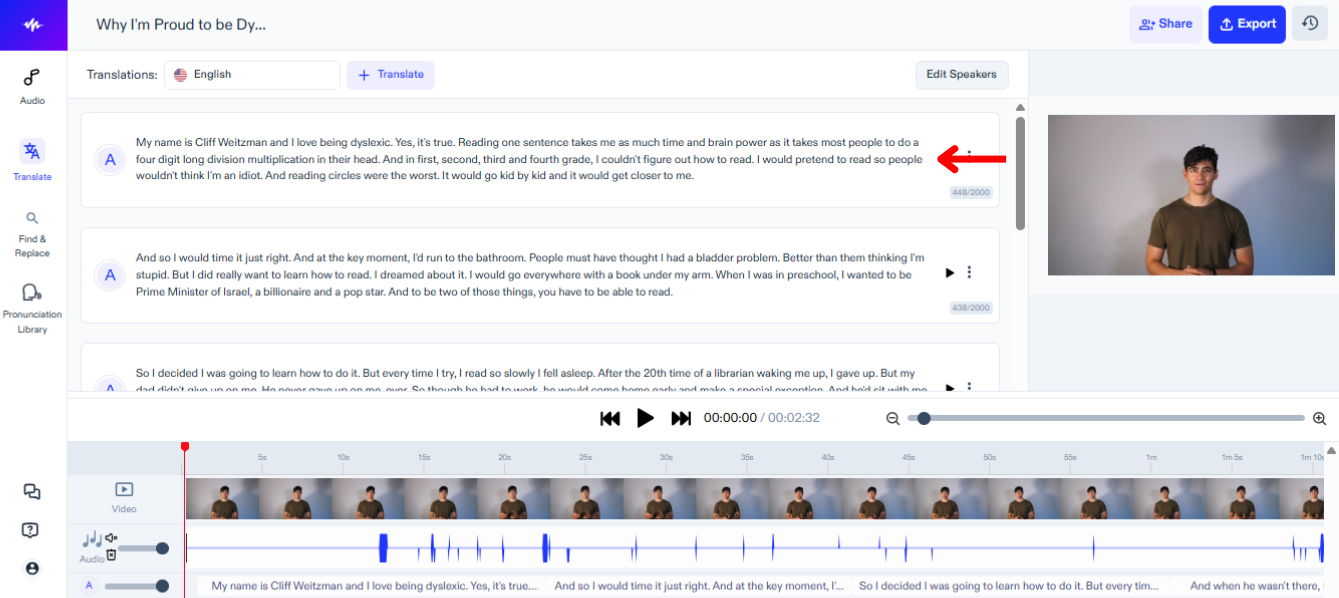
Se você quiser ajustar a transcrição do áudio original, basta:
- Clique no bloco de texto que você deseja alterar.
- Edite o roteiro como se estivesse editando um documento de texto.
Como Traduzir e Dublar Vídeos no Speechify Studio
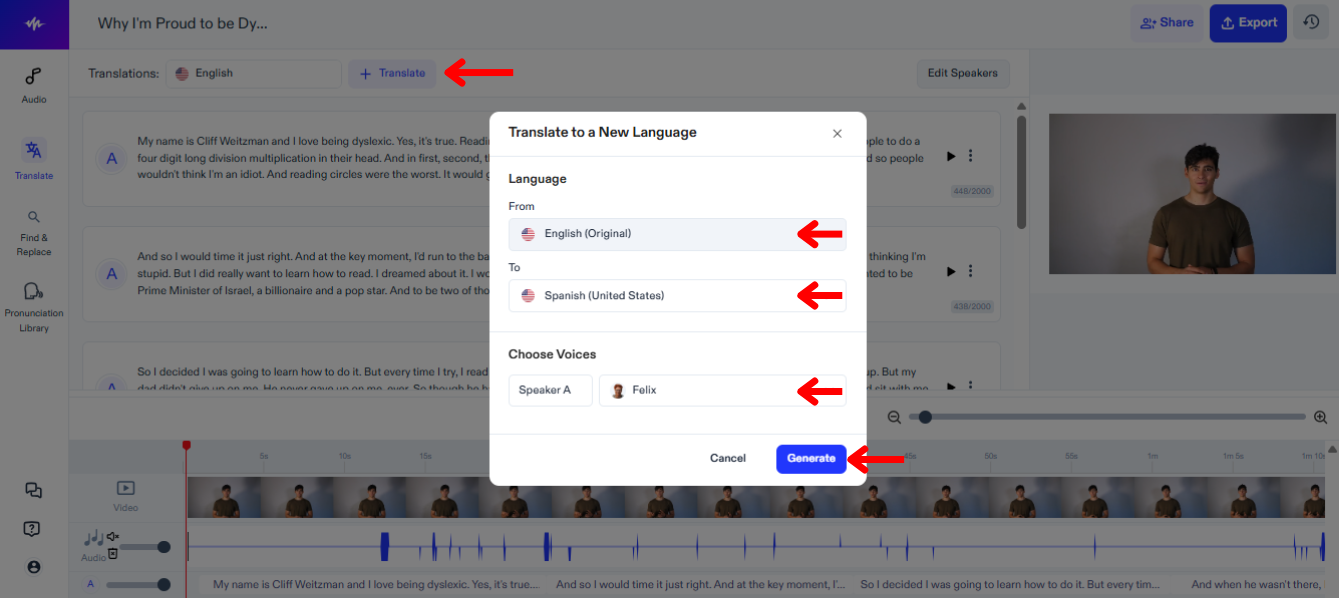
O próximo passo é traduzir e dublar seu vídeo para outro idioma. Siga este passo a passo:
- Clique em “Traduzir”.
- Em “De”, escolha o idioma atual do seu vídeo.
- Em “Para”, selecione o idioma para o qual você quer que o vídeo seja traduzido e dublado, entre mais de 60 opções.
- Escolha uma voz para cada locutor.
- Toque em “Gerar” e aguarde o Speechify Dubbing dublar seu vídeo automaticamente.
Como Editar a Tradução no Dublador do Speechify Studio
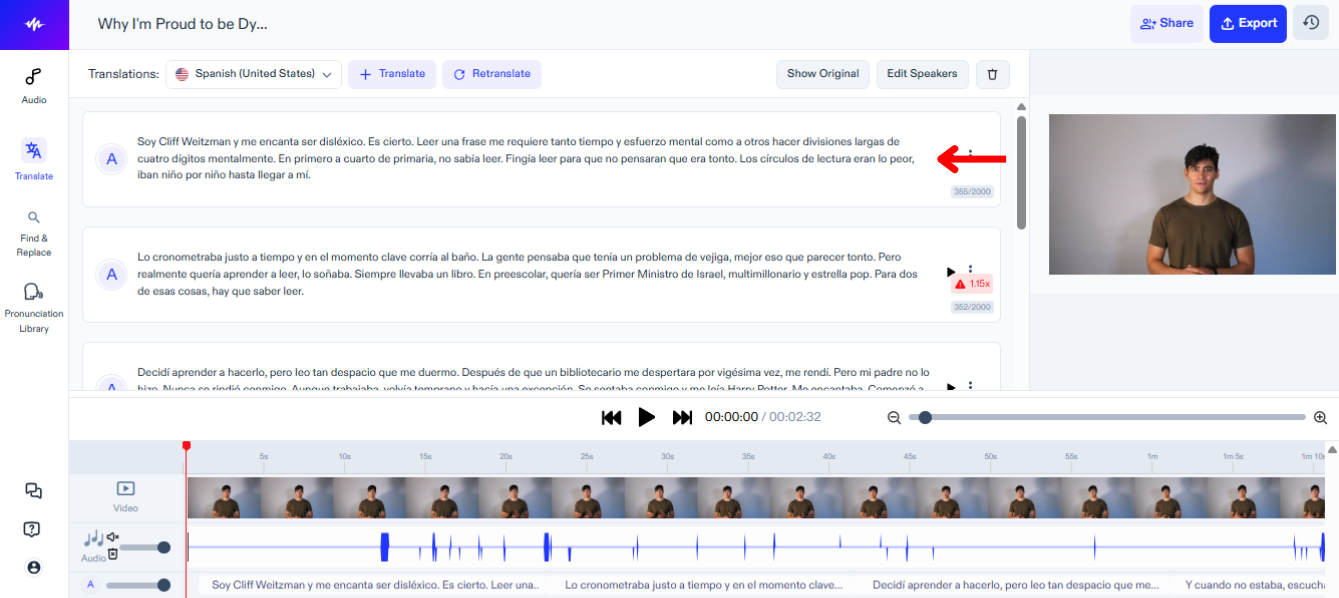
Editar a tradução do seu vídeo é simples, é só fazer o seguinte:
- Clique no bloco de texto que você deseja alterar.
- Edite o roteiro como se estivesse editando um documento de texto.
Como Alterar a Voz no Dublador do Speechify Studio
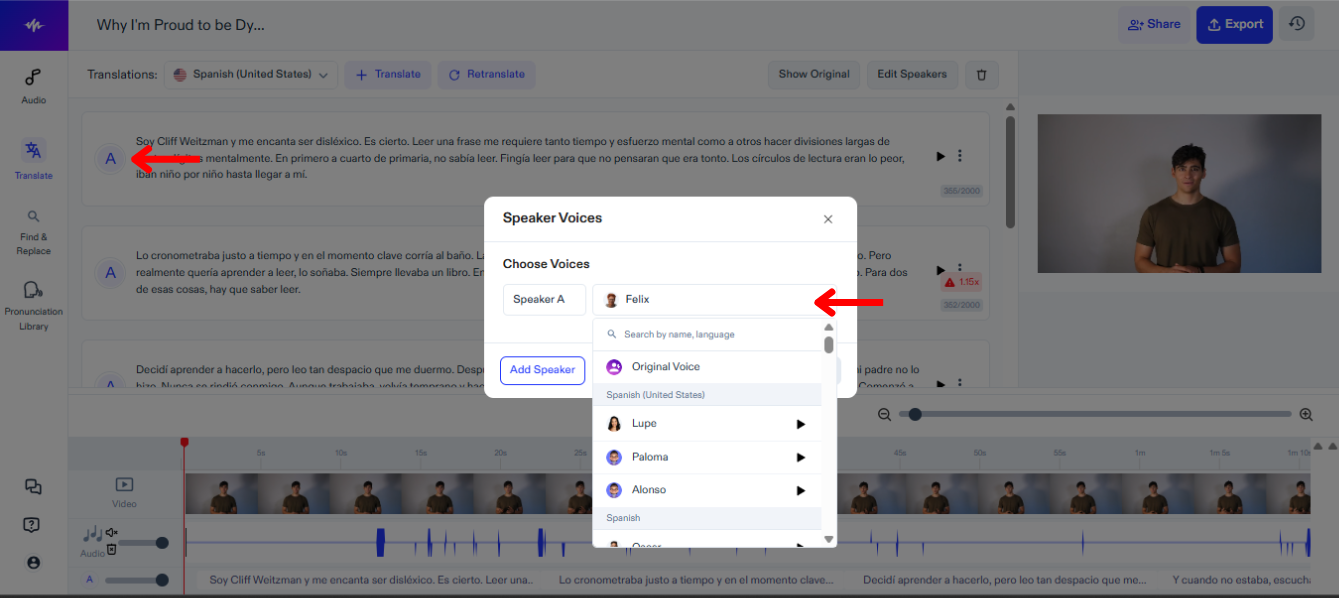
Você pode atribuir vozes diferentes para cada locutor do seu vídeo e trocar de voz a qualquer momento para encontrar a opção ideal. Para mudar a voz no Speechify Studio:
- Clique no ícone de alto-falante.
- Escolha entre mais de 200 vozes realistas.
Como Adicionar Música de Fundo no Dublador do Speechify Studio
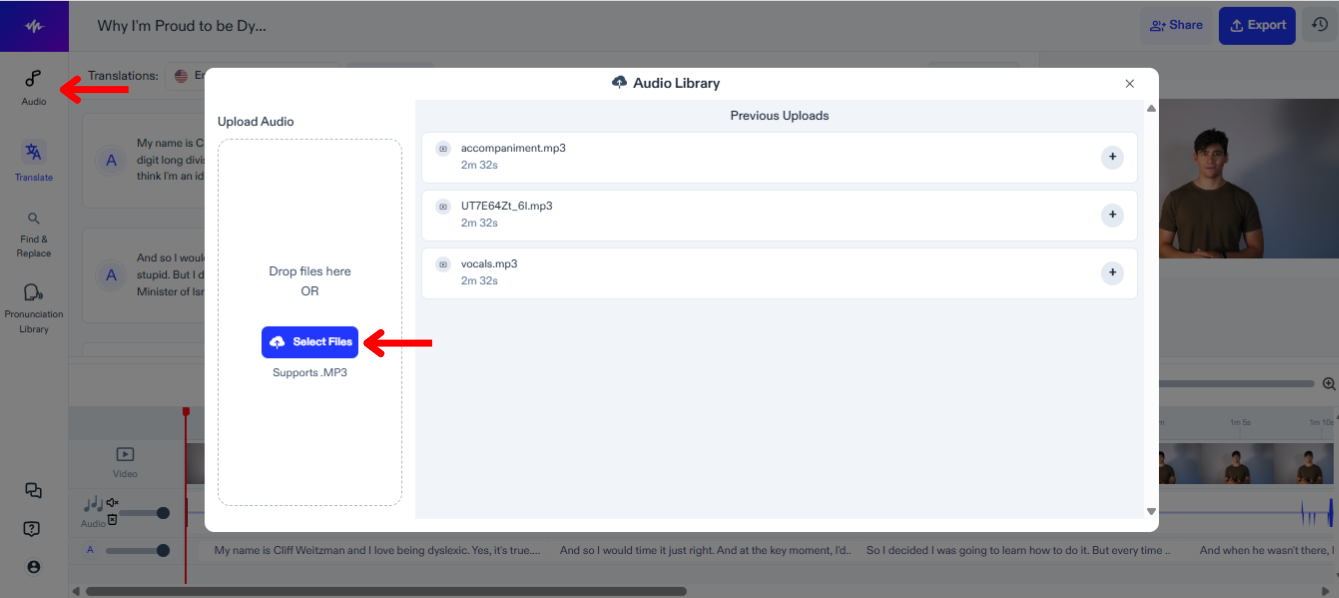
Para adicionar trilha de fundo, efeitos sonoros ou outros arquivos de áudio ao seu projeto de dublagem, siga estas etapas:
- Toque em "Áudio" na barra lateral à esquerda.
- Envie seus arquivos de áudio.
- Selecione o arquivo para adicioná-lo à linha do tempo de edição.
Como Adicionar à Biblioteca de Pronúncia no Dublador do Speechify Studio
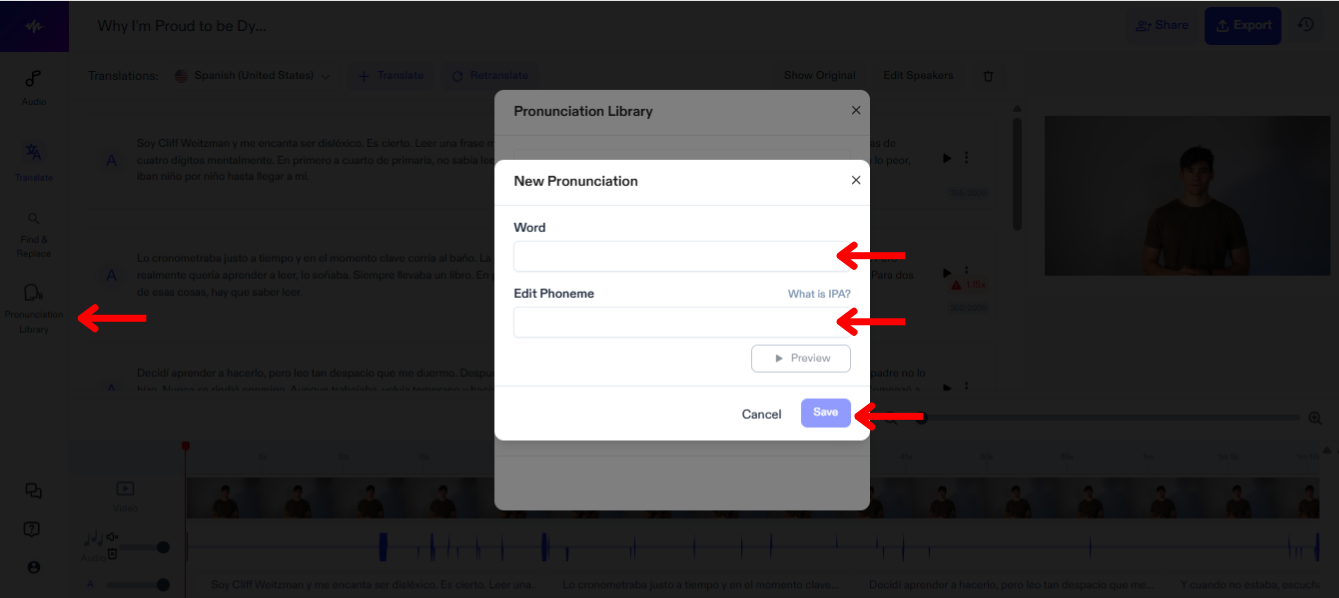
Adicionar termos à biblioteca de pronúncia no Speechify Studio permite personalizar e garantir a pronúncia correta de cada palavra e nome no seu vídeo. Siga estes passos para incluir um termo na biblioteca de pronúncias:
- Clique em “Biblioteca de Pronúncia”.
- Pressione “Criar Nova Pronúncia”.
- Insira a palavra junto com seu fonema.
- Toque em “Pré-visualizar” para conferir a nova pronúncia.
- Selecione “Salvar” para guardar a nova pronúncia para usos futuros.
Como Exportar Seu Projeto de Dublagem no Speechify Studio
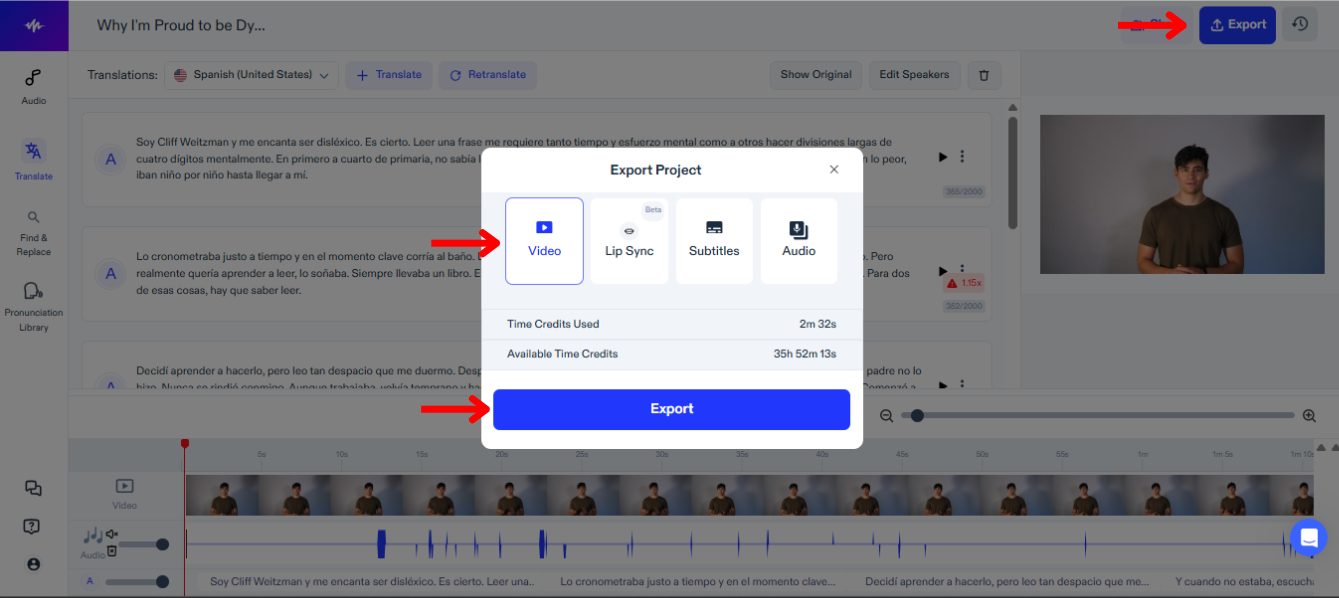
Exportar seu projeto de dublagem no Speechify Studio permite levar seu conteúdo dublado para diferentes plataformas e formatos. Para exportar:
- Clique em “Exportar”.
- Escolha se deseja exportar seu projeto em formato de vídeo, legendas (SRT, VTT ou PDF) ou áudio (MP3, WAV ou OGG).
Como Usar Lip Sync com Dublagem no Speechify Studio
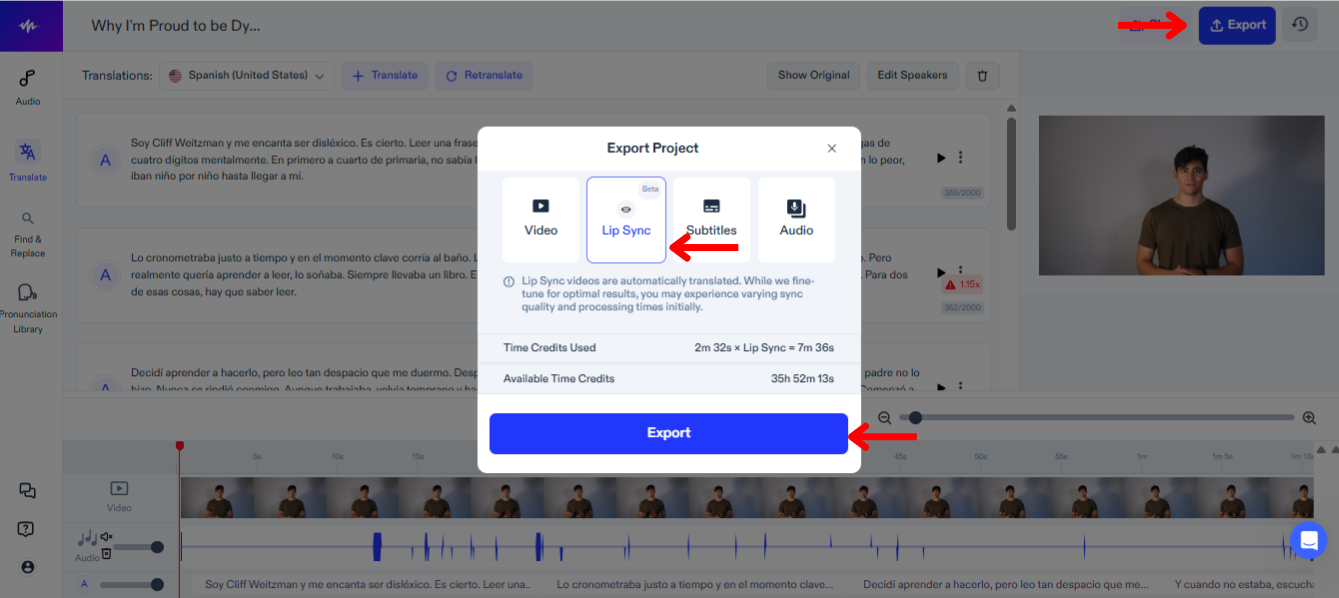
Usar a sincronização labial junto com a dublagem no Speechify Studio deixa a experiência do espectador ainda mais imersiva, alinhando o áudio falado aos movimentos labiais dos personagens. Para testar este novo recurso:
- Selecione “Exportar”.
- Escolha “Lip Sync”.
- Toque em "Exportar" e a funcionalidade Lip Sync, que ainda está em fase BETA, vai automaticamente dublar o vídeo para coincidir com a nova tradução.
Como Acessar o Suporte no Dublador do Speechify Studio
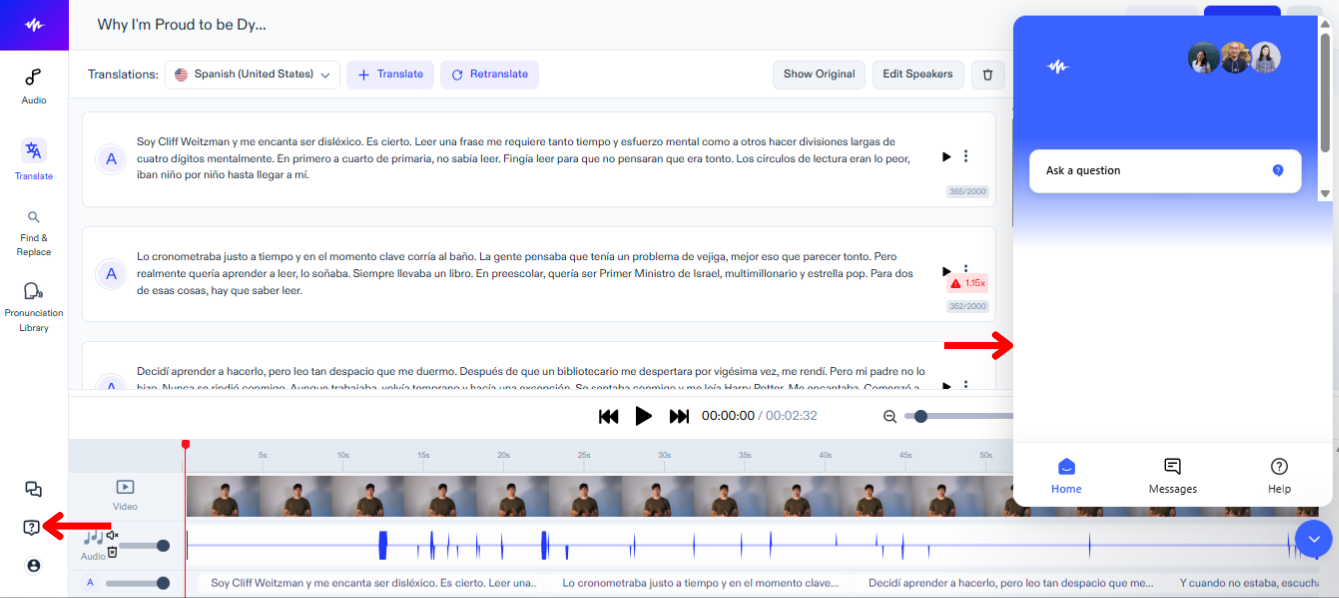
Se surgir algum problema técnico ou uma dúvida no meio do caminho, fale com nossa equipe de suporte seguindo estes passos:
- Toque no ícone de ponto de interrogação na barra lateral à esquerda.
- Envie uma mensagem para a equipe de suporte.




